Green Macaroni: A Suite of Free Creative Web Apps
A comprehensive collection of free browser-based design tools built to help artists, designers, makers, and small businesses create faster, experiment more freely, and solve practical creative problems.
Green Macaroni began as an experimental design lab for building useful, accessible creative tools. Each app was designed, built, tested, and refined as part of a larger ecosystem focused on creativity, usability, and visual exploration.
-
Free to use
-
Browser-based
-
Mobile-friendly (where applicable)
-
Built from scratch
-
Designed for real creative workflows
How and Why
For this project, Halifax Design Lab handled the complete creative and technical process: concept development, interface design, branding, front-end development, testing, icon design, user experience refinement, and deployment.
GridSmith
A browser-based poster design tool combining professional layout systems, typography, vector graphics, patterns, and real-time creative editing.
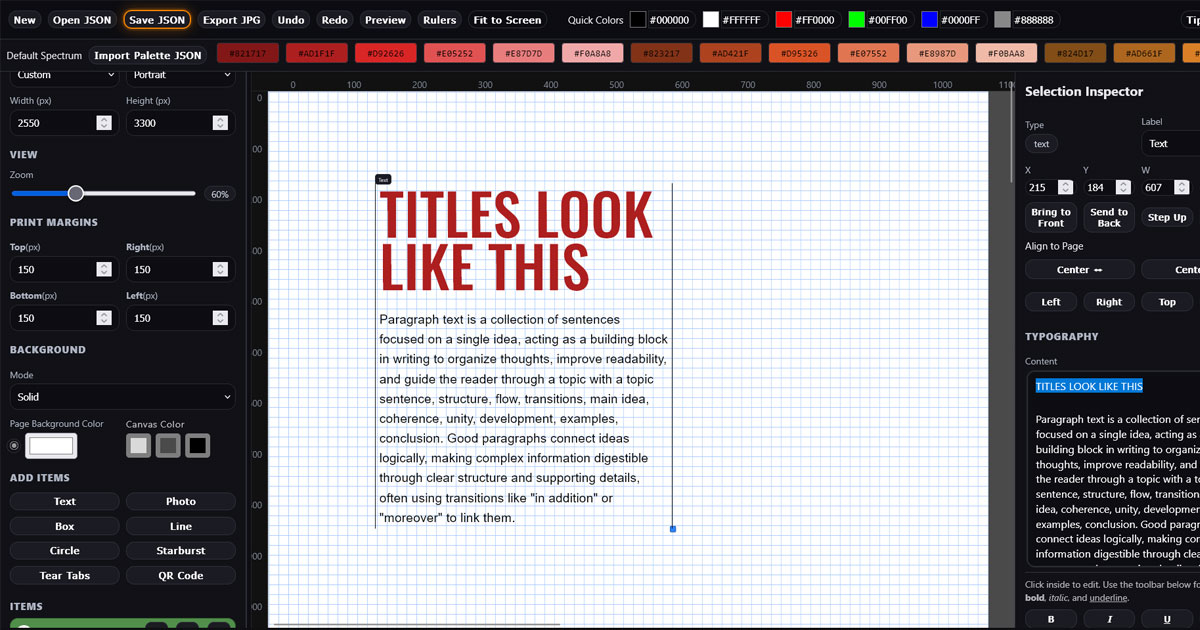
GridSmith was developed as a fully browser-based design application for creating sophisticated poster layouts without requiring traditional desktop design software.
The goal was to combine the precision of professional grid-based design with a fast, approachable creative workflow — allowing users to build, experiment, revise, and export complete poster compositions directly in the browser.
Designs remain fully editable throughout the process. Users can save projects as JSON, reopen previous work, undo and redo changes freely, and move between structured layout work and visual experimentation without interrupting their workflow.
GridSmith includes a growing range of tools normally associated with professional design applications, including:
- Live typography with access to the full Google Fonts library, including font weights, tracking, leading, paragraph spacing, alignment, inline styling, opacity, and blend modes
- Poster-scale typography supporting extremely large display type for oversized, cropped, and expressive typographic compositions
- Convert to Paths, which transforms Google Font text into true SVG vector outlines for unrestricted scaling, recoloring, rotation, effects, and graphic manipulation — while retaining the ability to restore the original editable text
- Adjustable layout grids with columns, rows, gutters, margins, baseline grids, major axes, rulers, and a Structure view for visualizing the underlying composition system
- Precise object positioning, sizing, alignment, layering, rotation, and multi-object selection tools
- A built-in Pattern Library containing seamless PatternSmith-generated artwork that can be applied directly to poster backgrounds
- A shared SVG Library integrated with PatternSmith, allowing reusable vector artwork and typographic marks to be placed directly into GridSmith designs
- SVG recoloring, opacity, blend modes, drop shadows, glow effects, scaling, and rotation for flexible vector artwork styling
- Photo placement and background image controls for combining typography, graphics, patterns, and photographic elements
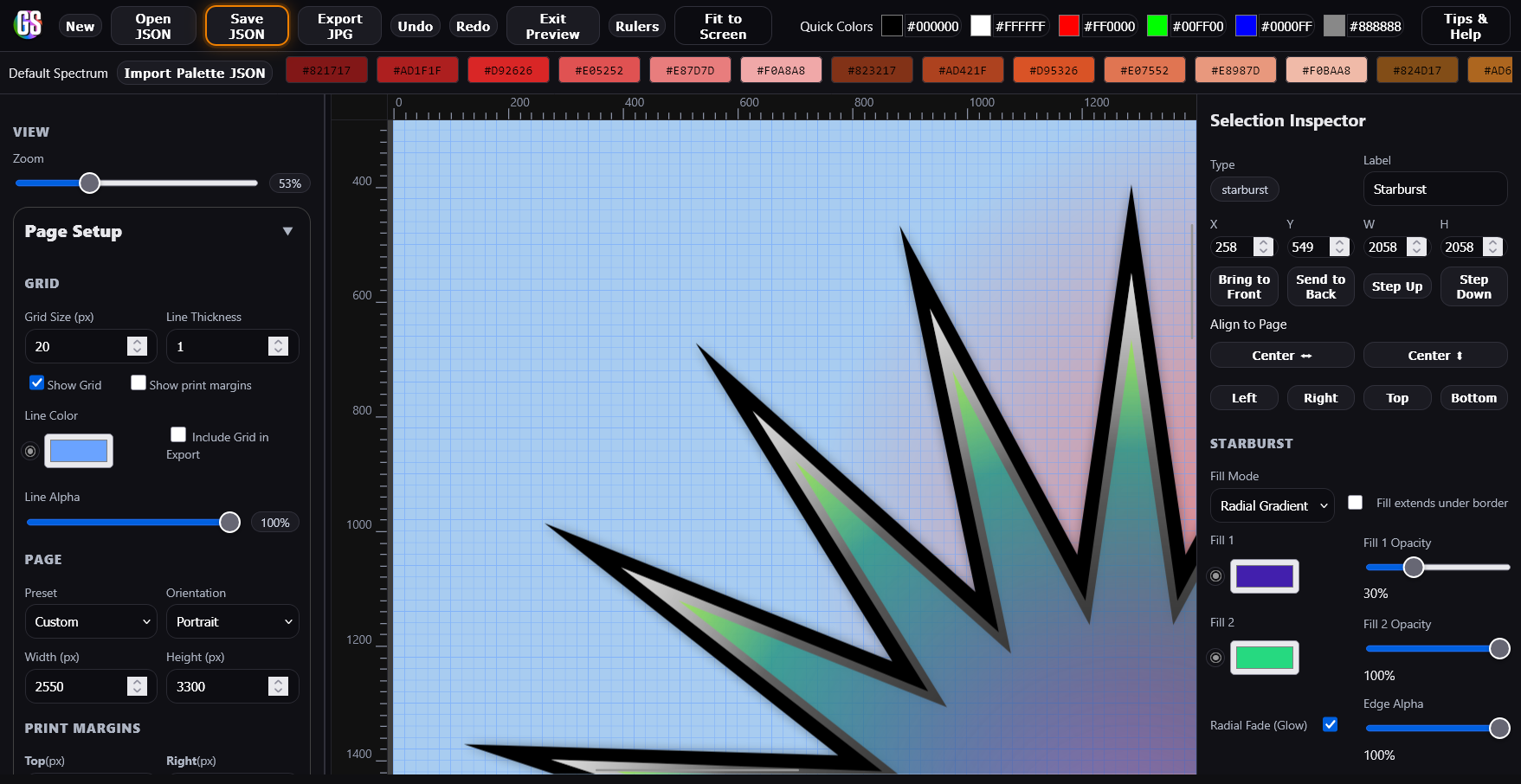
- Rounded boxes, circles, lines, customizable starbursts, and other geometric design elements
- Drop shadows, gradients, transparency, glow effects, and blend modes for layered visual styling
- A customizable starburst engine for promotional graphics, callouts, and expressive poster elements
- Tear-off tabs for creating practical real-world posters and notices
- A built-in QR code generator for interactive print and promotional applications
- Palette integration for incorporating color schemes created with Palette Grabber
- Print margin guides and optional white printer margins for designs intended for printers that cannot output edge-to-edge
- Workspace color options, Preview mode, Fit to Screen, keyboard shortcuts, and other workflow tools designed to reduce friction during longer design sessions
A central challenge in developing GridSmith has been balancing feature depth with accessibility. As increasingly sophisticated typography, vector, layout, image, and effects systems were added, the interface had to remain understandable to users who may not have experience with professional design software.
Another major consideration was maintaining responsive browser performance while supporting large-format typography, layered objects, real-time effects, editable SVG graphics, complex grid structures, and high-resolution poster layouts.
The result is an increasingly capable all-in-one poster design environment that combines structured graphic design principles with a playful, experimental workflow. GridSmith can be used for everything from restrained Swiss-inspired layouts to oversized expressive typography, promotional posters, event graphics, notices, and print-ready visual compositions.
You can try GridSmith here: GreenMacaroni.com/GridSmith
CutoutSmith
A browser-based background removal and precision masking tool for creating clean, professional transparent images
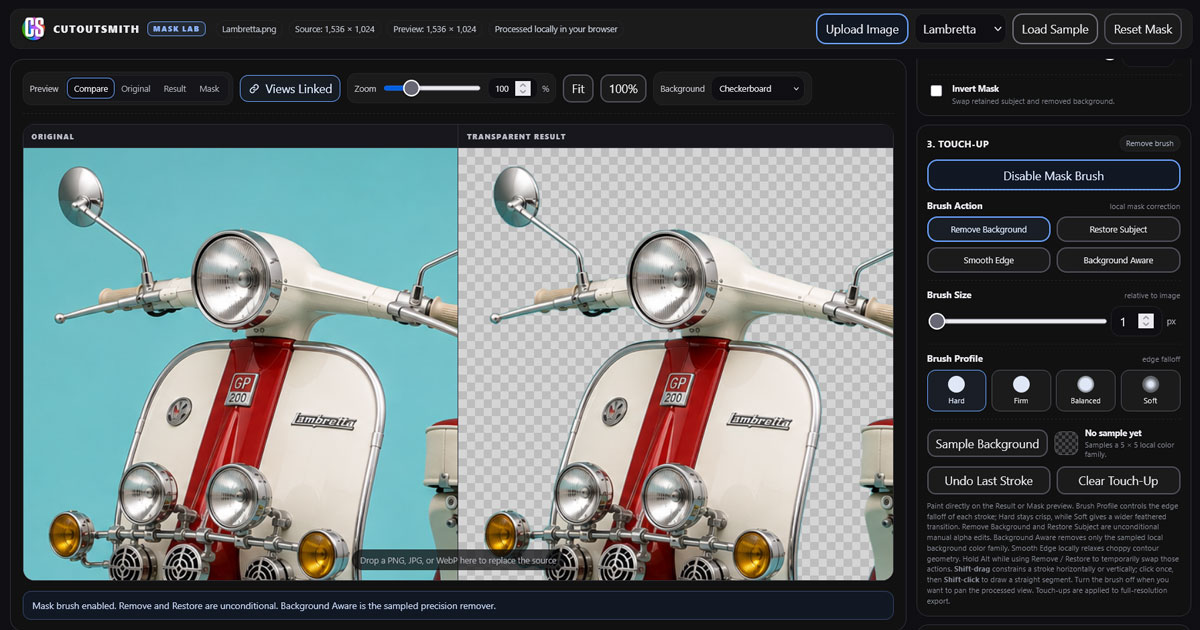
CutoutSmith was developed to make high-quality image cutouts faster and more accessible, combining automatic background detection with the kind of detailed manual control normally associated with professional desktop image-editing software.
Rather than simply deleting pixels from an image, CutoutSmith generates and refines an alpha mask while preserving the original source image. This allows users to remove backgrounds cleanly while retaining fine detail and making non-destructive corrections throughout the process.
The application is designed around a simple workflow: automatically identify the background, refine the mask, then use precision touch-up tools only where they are needed.
Users can adjust and refine the automatic cutout using controls including:
- Background tolerance for controlling how broadly similar background colors are detected
- Expand and Contract controls for adjusting the boundary of the retained subject
- Feathering for controlling edge softness
- Edge Smoothing for reducing jagged or irregular mask boundaries
- Invert Mask for quickly reversing foreground and background selection
- All processing takes place locally in the browser, and the original image data remains untouched while the transparency mask is created and refined. Users can also download the completed alpha channel mask as a standalone image, providing a master mask template that can be reused in other image-editing and compositing workflows.
For difficult images, CutoutSmith includes a dedicated Mask Brush system that allows users to work directly on the generated mask without altering the original image.
- Remove Background brush for direct mask correction
- Restore Subject brush for recovering areas removed by the automatic process
- Background Aware brush that uses sampled background colors for targeted removal
- Smooth Edge brush for localized edge refinement
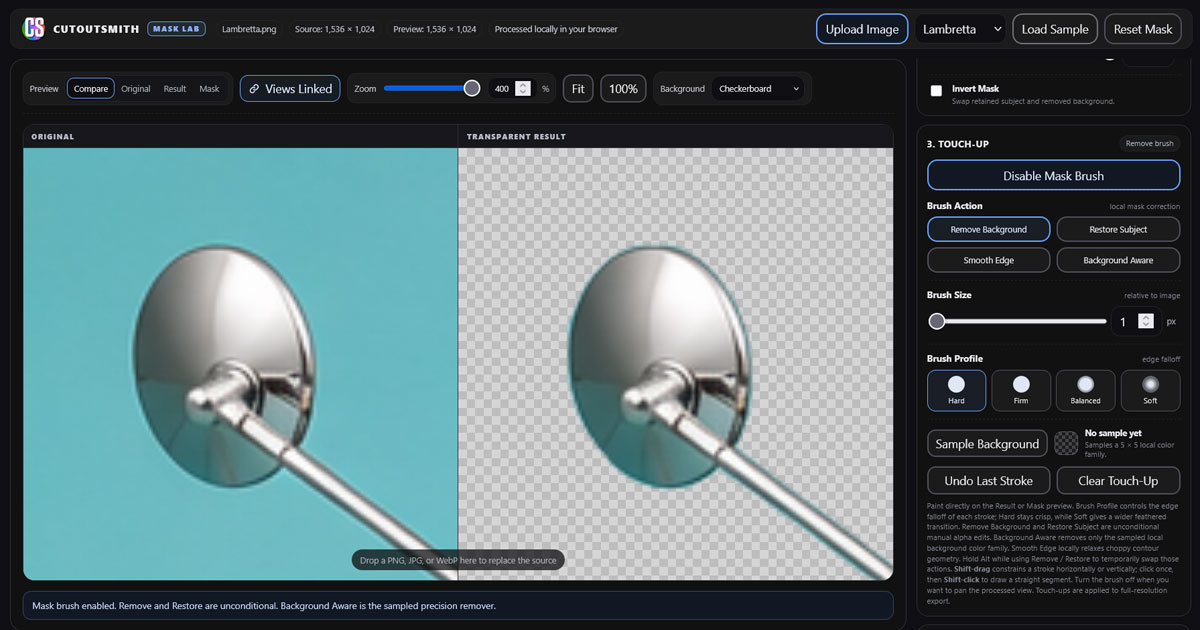
- Brush sizes down to 1 pixel for extremely precise correction at high zoom levels
- Four Brush Profiles: Hard, Firm, Balanced, and Soft, allowing different edge falloff characteristics for different subjects
- Per-stroke brush profiles, allowing different areas of the same mask to be treated independently
- Undo support for fast, experimental brush work without interrupting the workflow
CutoutSmith also includes linked Original and Result views, high-magnification zoom, multiple preview modes, and checkerboard transparency display, allowing users to inspect difficult edges closely while comparing the processed image directly against the source.
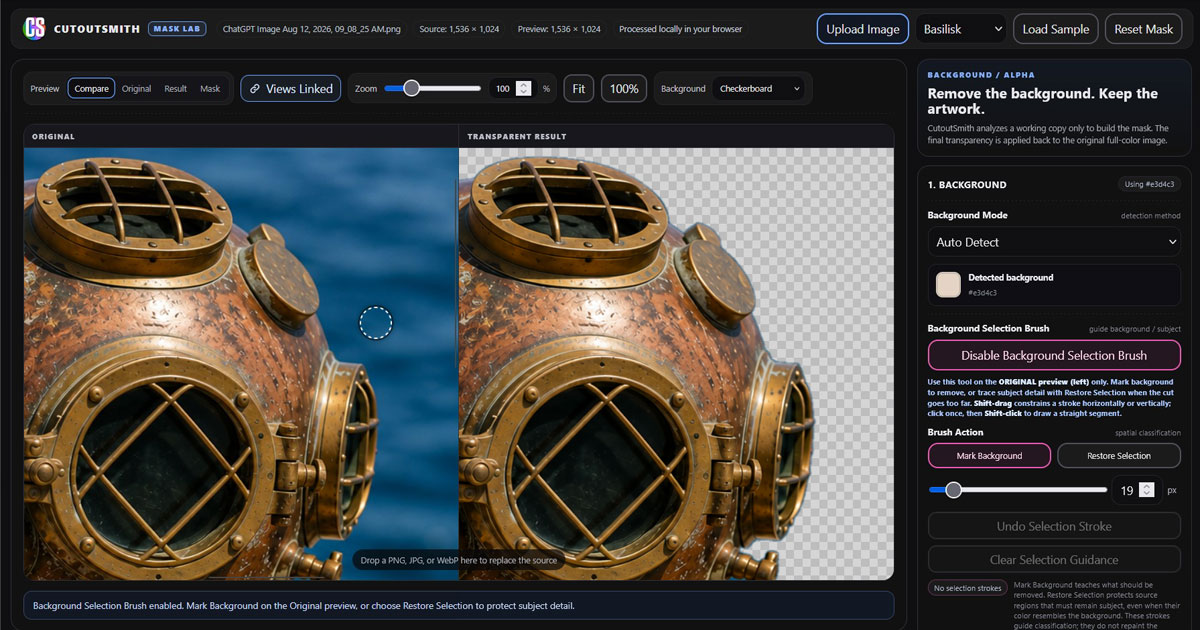
One of the major challenges in developing CutoutSmith was handling backgrounds that appear simple to the eye but contain subtle color variation, shadows, reflections, compression artifacts, and small enclosed areas between objects such as leaves, branches, cables, or mechanical details.
The solution was to combine automatic color-family detection with progressive manual refinement rather than relying on a single destructive background-removal algorithm. This allows straightforward images to be processed quickly while still giving users the precision needed for challenging real-world photographs.
The result is a focused professional masking tool that can produce clean transparent images quickly, while still allowing pixel-level correction when the image demands it.
All processing takes place locally in the browser, and the original image data remains untouched while the transparency mask is created and refined.
You can see the full site here: GreenMacaroni.com/CutoutSmith
PatternSmith
A generative tool for creating seamless, high-quality pattern images
Designed for web, print, and production workflows — including textiles, surface design, and screen printing.
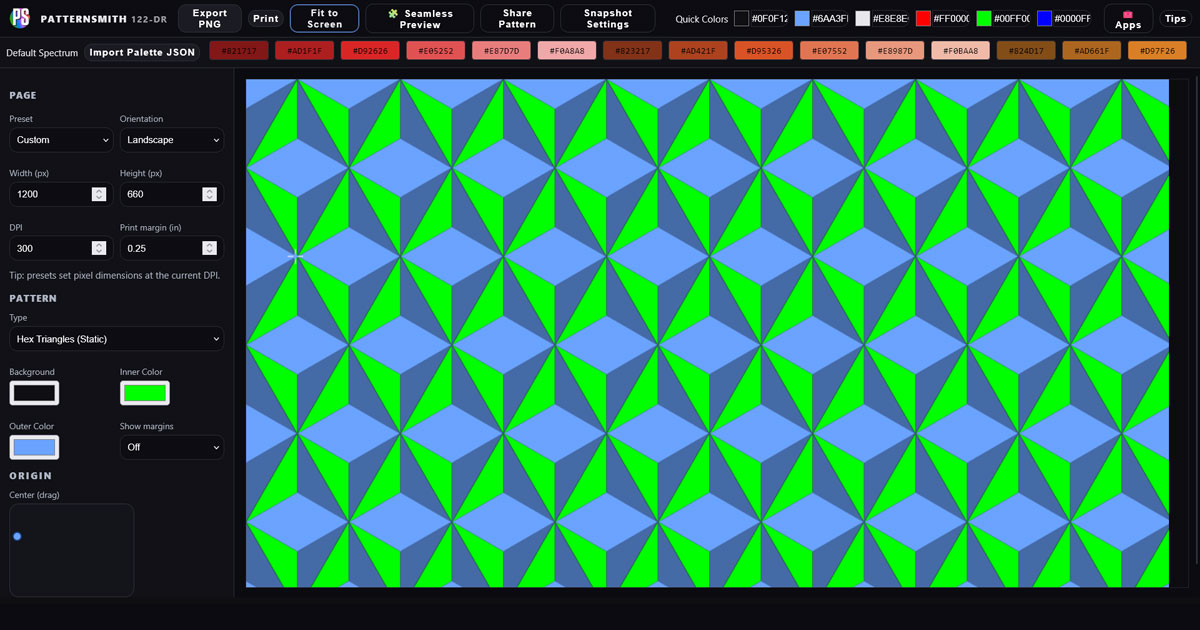
PatternSmith was developed as a browser-based generative design tool, built to give users direct control over the creation of seamless patterns and complex visual compositions.
Rather than relying on fixed templates, PatternSmith functions as a flexible system — allowing users to explore structured, mathematical layouts alongside more organic, expressive forms. Each pattern type is built as its own engine, designed to produce distinct visual outcomes while maintaining a consistent and intuitive interface.
A core focus of the tool is true seamlessness. Every pattern is engineered to tile perfectly, ensuring designs can be used at any scale without visible breaks — from digital backgrounds to large-format print and textile applications.
Key features include:
- Multiple pattern engines ranging from geometric to organic systems
- Real-time controls for rapid experimentation and iteration
- High-resolution image output suitable for professional use
- Advanced visual effects including glow, layering, and texture systems
- Structured presets that guide exploration while maintaining flexibility
- Create seamless patterns from your own logos or illustrations, or use the built-in image library
- Saved seamless tiles can then be used in GridSmith
One of the primary challenges in developing PatternSmith was balancing randomness with control. Generative systems can easily become chaotic or repetitive, so careful attention was given to how variation is introduced — ensuring results remain visually interesting while still feeling intentional.
Another major challenge was maintaining perfect seamless tiling while introducing complex effects. This required precise handling of edge behavior so patterns repeat cleanly without visual artifacts.
PatternSmith evolved into more than a pattern generator — it became a creative engine. It allows users to explore, refine, and discover unexpected results within a structured system, producing patterns that are both visually compelling and practically usable.
You can see the full site here: GreenMacaroni.com/PatternSmith

Vectorwright
A batch-first image tracing tool for converting raster artwork into clean, editable SVG files
Designed for illustrators, designers, makers, and production workflows that require fast, detailed vector conversion.
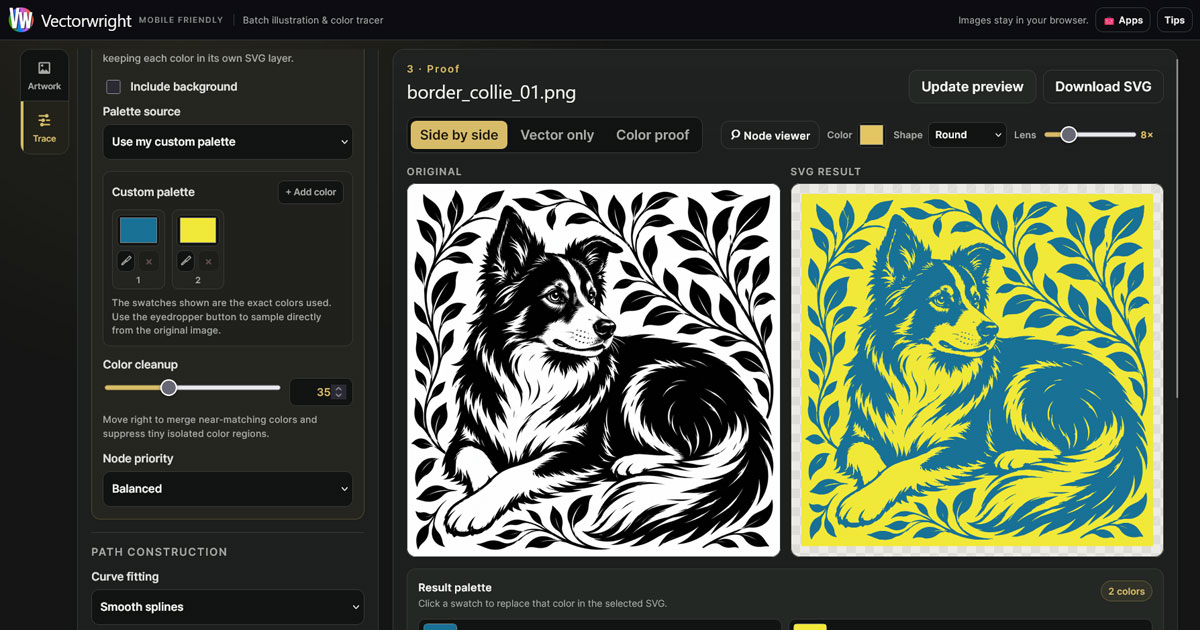
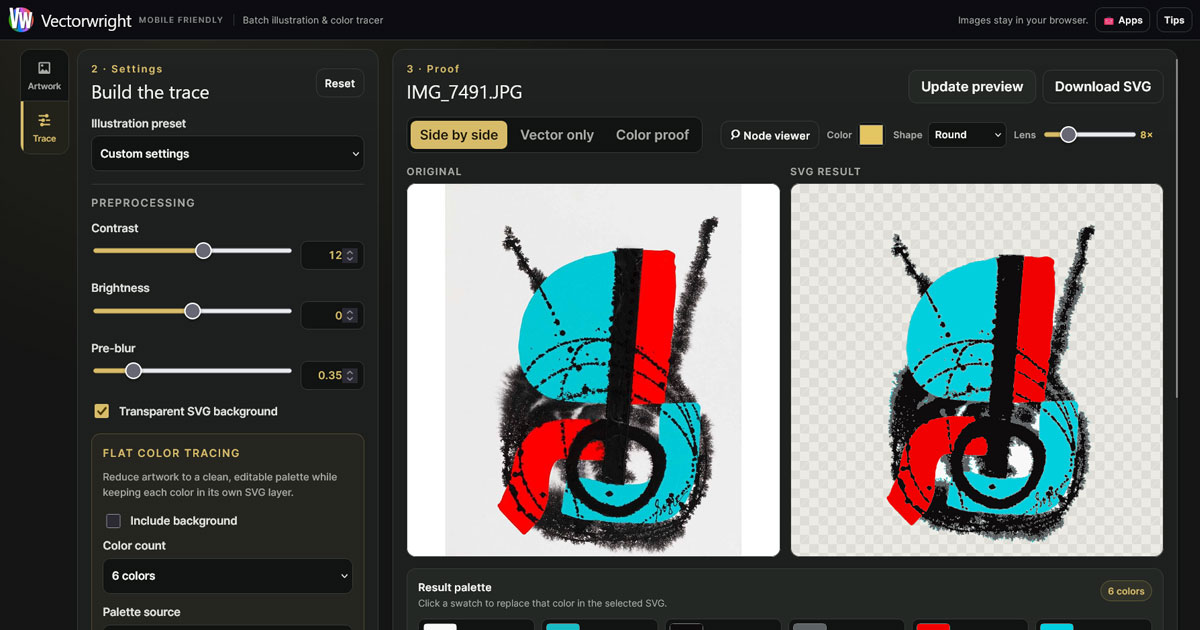
Vectorwright was developed as a browser-based image tracing tool for converting raster images into clean, scalable SVG artwork.
While many tracing tools are designed around processing one image at a time, Vectorwright was built with a batch-first workflow. Users can load individual images, complete batches, or entire folder structures and process them through one consistent interface.
Each image can be reviewed and adjusted independently, with a live SVG preview allowing users to evaluate detail, smoothness, colors, background handling, and overall tracing quality before exporting the final artwork.
A core focus of Vectorwright is preserving meaningful detail without producing unnecessarily complicated vector files. This makes it particularly useful for logos, illustrations, line art, high-contrast artwork, and other images that need to remain crisp and editable at any size.
Key features include:
- Trace individual images, whole batches, or nested folders
- Live SVG previews with image-by-image queue navigation
- Adjustable tracing, detail, and curve-smoothing controls
- Optional background inclusion, removal, or recoloring
- Custom color palettes with direct eyedropper sampling
- Node counting and a magnified node viewer for inspecting vector complexity
- Keyboard navigation for quickly reviewing queued images
- Clean, editable SVG output that remains sharp at any scale
- Mobile-friendly operation with no software installation required
- SVG artwork can be prepared for use in PatternSmith and other design workflows
One of the primary challenges in developing Vectorwright was balancing visual accuracy with manageable vector complexity. Preserving more detail can introduce additional nodes, while excessive simplification can remove the character and structure of the original artwork. The controls were carefully refined to give users direct control over that balance.
Another major consideration was performance. Processing large images and complete batches directly in the browser required an interface that remained responsive while tracing, previewing, navigating, and exporting multiple files.
Special attention was also given to transparency and background detection. Images containing white artwork, dark artwork, colored backgrounds, or embedded background shapes all require different handling, so Vectorwright provides flexible background controls rather than assuming a single tracing workflow.
The result is a practical vector-production tool that significantly reduces the repetitive work involved in preparing raster artwork for scalable use.
Vectorwright bridges the gap between image creation and vector production — allowing users to convert entire collections of artwork into clean, editable SVG files quickly and consistently.
You can see the full site here: GreenMacaroni.com/Vectorwright
Palette Grabber
An advanced color analysis and palette-building tool for designers and creatives
Built to extract, refine, and manage usable color systems from real-world imagery
Palette Grabber was developed to solve a common but often overlooked problem in design: turning visual inspiration into structured, usable color systems.
While many tools can extract colors from an image, they often produce results that feel random or impractical. Palette Grabber was designed to go further — not just identifying colors, but helping users build meaningful, editable, and reusable color libraries.
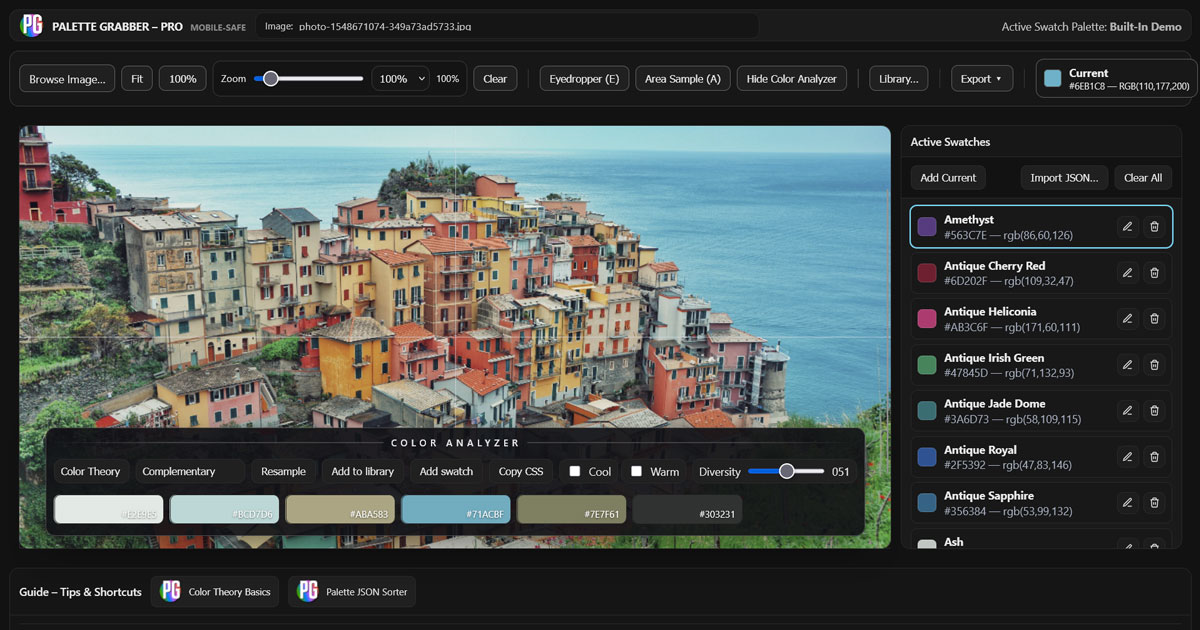
At the core of the tool is an intelligent color analyzer engine, capable of both pixel-precise sampling and dynamic area-based analysis. This allows users to capture individual colors with accuracy, or derive balanced palettes that reflect the broader visual character of an image.
Users can work from uploaded images or live camera input, making it possible to capture color inspiration directly from the real world and immediately translate it into a structured palette.
Key capabilities include:
- Building and managing large, editable color libraries
- Extracting palettes from images or live camera input
- Pixel-level eyedropper sampling and dynamic area-based color analysis
- Smart preset filters that can be adjusted to expand or refine palette range
- Loading existing libraries and analyzing images to identify closest color matches
- Saving, loading, and editing both individual swatches and full libraries
- Import/export support for sharing palettes across workflows and teams
- Export options including JPG, PDF, and simplified color grids for painters or decorators
- Color palettes can be imported into GridSmith, Font Harmony, and Font Degrader
“No other browser-based tool offers this level of control over palette creation and library management.”
A major challenge in developing Palette Grabber was ensuring that extracted palettes feel intentional rather than arbitrary. This required careful refinement of how colors are grouped, filtered, and presented, so that results are immediately useful in real design work.
Another key consideration was performance and usability. The tool needed to handle large images, zooming, and real-time interaction without slowing down the user’s workflow. This led to a highly responsive interface with smooth zooming, scrolling, and live updates.
Palette Grabber also introduces a collaborative dimension, allowing users to build, refine, and share color libraries with others — turning individual inspiration into shared creative resources.
The result is more than a palette extractor — it is a full color system tool, designed to bridge the gap between inspiration and execution.
You can see the full site here: GreenMacaroni.com/Palette-Grabber
InkSmith
A browser-based print reproduction studio for creating authentic analog ink, photocopy, halftone, and color-separation effects
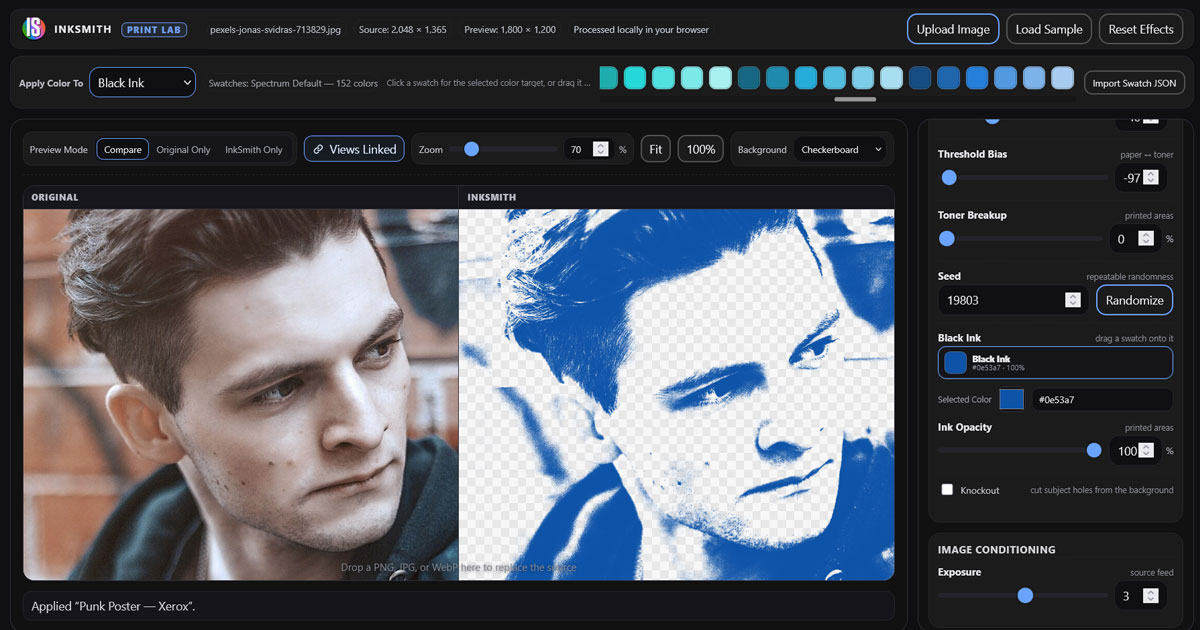
InkSmith was developed as a browser-based image-processing tool designed to recreate the visual character of traditional printing, photocopying, halftone screening, posterization, and imperfect color reproduction.
Rather than treating these effects as simple filters, InkSmith approaches them as reproduction systems. Users can manipulate the individual qualities that give printed imagery its character, from dot structure and exposure to ink density, plate registration, paper color, and color separation.
The goal was to create a tool that could produce believable analog reproduction artifacts while still giving designers precise control over the final image.
InkSmith includes several specialized image-processing engines and controls, including:
-
- Photocopy and Xerox-style processing with independent exposure, threshold, contrast, and tonal controls
- Traditional halftone screening with adjustable dot size, screen patterns, angles, and global dot-size controls
- Posterized image processing that converts photographs into solid, hard-edged tonal and color shapes
- Multi-color poster separation with independently editable poster colors
- Color-plate reproduction for creating layered print separations and simulated press output
- Independent plate positioning for intentionally introducing registration errors and misaligned color separations
- Bad-registration controls for recreating the visual imperfections of offset, screen-printing, and inexpensive commercial printing
- Independent ink opacity and color controls for each plate
- Transparent knockout and background controls for preparing artwork for use in other design applications
- Adjustable background colors and opacity with transparency previewing
- Preset systems for quickly recreating recognizable print styles, including high-contrast punk poster, Xerox, halftone, and posterized treatments
- Pan and navigation controls for closely examining processed artwork
- All image processing performed locally in the browser without requiring uploaded artwork to be sent to a remote server
One of the major challenges in developing InkSmith was reproducing theappearanceof real-world printing processes. A change to exposure, threshold, dot size, ink density, or plate position can really change the character of the final reproduction.
This required building the application around a series of dedicated processing engines rather than applying decorative effects after the fact. Photocopy, halftone, posterized, and color-plate imagery each needed their own controls while still behaving as parts of a consistent visual system.
Another important part of the project was introducing intentional imperfection without making the results feel artificial. Misregistration, tonal loss, coarse screening, uneven reproduction, and limited-color printing are most convincing when they behave like consequences of a physical process rather than randomized digital distress.
The result is a flexible print-reproduction studio that allows designers, illustrators, artists, and printmakers to transform digital imagery into artwork with the character of photocopied flyers, screen prints, offset color separations, vintage punk gig posters, halftone reproductions, and imperfect commercial printing entirely within the browser.
You can see the full site here: GreenMacaroni.com/InkSmith
FilterSmith
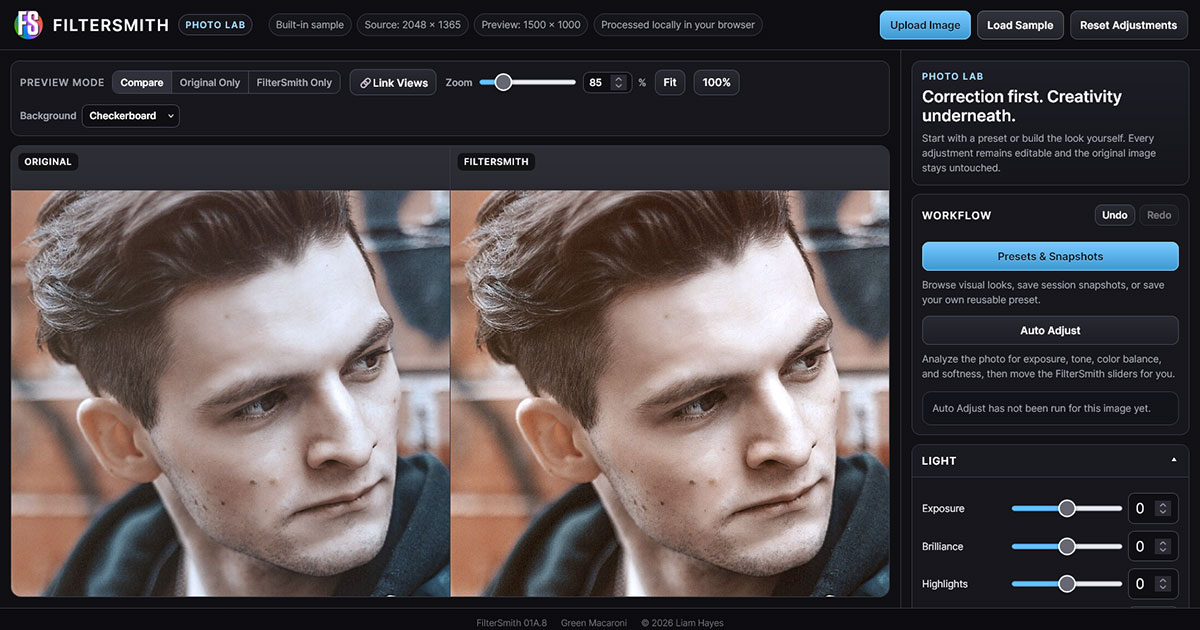
A browser-based photographic adjustment, enhancement, color grading, and creative filter studio designed to make photo editing fast, understandable, and completely editable.
FilterSmith was developed as a companion to the Green Macaroni image-processing tools, with a deliberately different purpose: improve the photograph itself before transforming, masking, presenting, or exporting it.
The application combines the accessibility of a mobile photo editor with a more transparent professional workflow. Presets provide fast starting points, but they are not hidden effects. Applying a preset simply adjusts the same controls available to the user, allowing every part of the result to be inspected, modified, or completely reversed.
All image processing takes place locally in the browser, allowing photographs to be edited without uploading them to a remote image-processing service.
FilterSmith includes a broad range of photographic controls and workflow tools, including:
- Exposure, Brilliance, Highlights, Shadows, Contrast, Brightness, Black Point, and Whites controls for tonal correction
- Saturation, Vibrance, Warmth, Tint, Fade, and other color controls for photographic correction and creative grading
- Detail controls for Sharpness, Definition, and Noise Reduction
- Black & White controls with independent tonal response adjustments for different color ranges
- A visual preset library with categories including clean, warm, cool, film-inspired, monochrome, vintage, and creative photographic treatments
- Live preset previews generated from the currently loaded photograph rather than generic demonstration thumbnails
- Session Snapshots for preserving alternate editing directions without affecting the original image
- Saveable and shareable preset files for recreating custom photographic looks
- Side-by-side Original and FilterSmith views for direct visual comparison
- Linked zoom and navigation controls for close inspection of both the source and adjusted photograph
- Sepia Tone and Vintage Photo treatments for traditional photographic styling
- Local browser-based processing so uploaded photographs remain on the user’s device
One of the most important features developed for FilterSmith is Auto Adjust.
Rather than applying a hidden correction filter, Auto Adjust analyzes the photograph and then moves FilterSmith’s existing editable controls. The system examines exposure, tonal distribution, highlights, shadows, black and white points, color balance, saturation, edge detail, and apparent softness before deciding whether corrections are necessary.
A central design goal was teaching Auto Adjust when not to make a change. Photographs can legitimately contain deep shadows, bright backgrounds, pure whites, strong blacks, saturated colors, or deliberately low-key lighting. Treating every unusual histogram as a defect can easily make a good photograph worse.
The analysis system was therefore refined using photographic calibration images containing grayscale ramps, saturated primary colors, neutral references, multiple skin tones, highlight detail, shadow detail, and fine texture. This helped establish a more conservative correction system that protects healthy images rather than forcing every photograph toward the same appearance.
Auto Adjust also produces a visible report explaining exactly what it changed. If Exposure, Shadows, Warmth, Sharpness, or another control is adjusted, the user can see the value and immediately refine it further.
This reporting system became an important part of the overall interface because it turns automatic correction into an understandable starting point rather than an unexplained decision made by the software.
The result is a photographic editor designed around a simple principle: correction first, creativity underneath. FilterSmith can quickly improve an everyday photograph, establish a reusable visual style, or provide a carefully corrected source image for further work in InkSmith, CutoutSmith, Instant Photo Object, ResizeSmith, or other design software.
You can try FilterSmith here: GreenMacaroni.com/FilterSmith
ResizeSmith
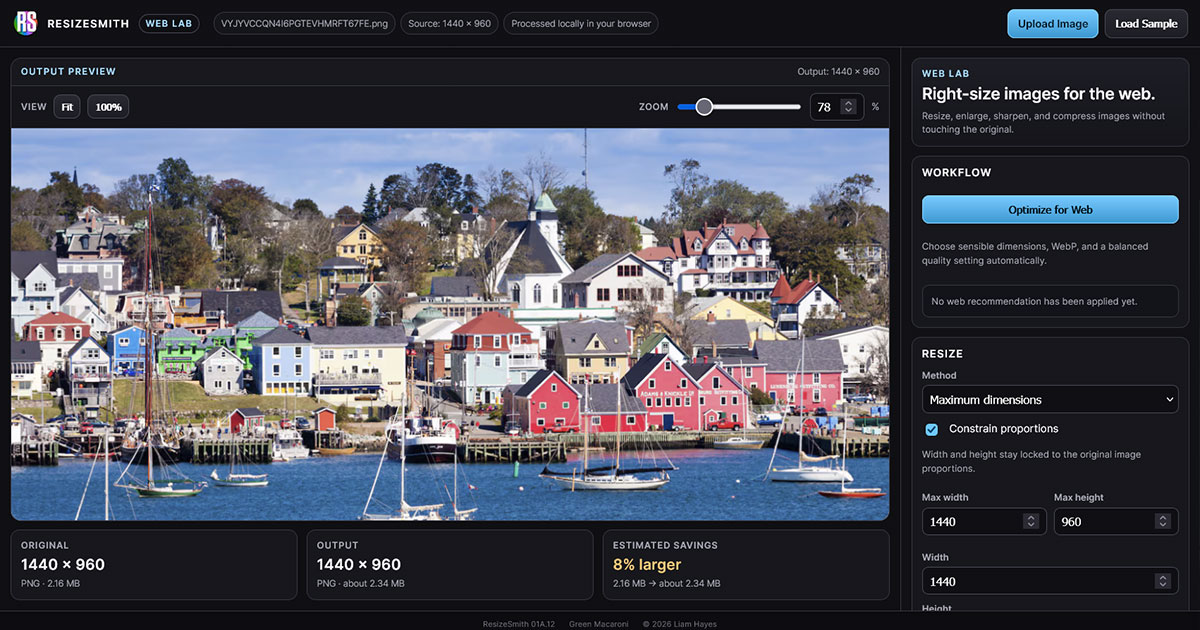
A browser-based image resizing, enlargement, sharpening, and compression tool designed to prepare photographs and graphics for practical web use.
ResizeSmith began as a utility inside the Green Macaroni Image Studios WordPress plugin, where it became apparent that one of the most common image tasks for website owners had not yet been addressed: preparing oversized or incorrectly sized images for the web.
The concept was expanded into a standalone application that combines resizing, compression, format conversion, enlargement, image inspection, and educational guidance in one focused workflow.
ResizeSmith is designed to preserve the original image while allowing users to quickly produce appropriately sized copies for websites, content management systems, social media, and other digital applications.
Key features include:
- Resize by maximum dimensions, width, height, percentage, or common web sizes
- Constrain Proportions enabled by default to prevent accidental image distortion
- Common long-edge presets including 1920, 1600, 1200, 800, 600, and 400 pixels
- Immediate visual feedback when size presets are selected
- JPEG, PNG, and WebP output
- Adjustable JPEG and WebP compression quality
- Automatic transparency detection for PNG artwork
- Original dimensions, output dimensions, original file size, estimated output size, and percentage savings displayed directly in the interface
- Optimize for Web for quickly selecting sensible dimensions, format, and compression settings
- Optional image enlargement beyond the original source dimensions
- Fit, 100%, and adjustable Zoom views for inspecting resized and enlarged images closely
- Hand-drag navigation for panning around enlarged images at high magnification
- Edge Crispness, Micro Contrast, and Global Sharpen controls for compensating for some of the softness introduced during raster enlargement
- Separate enlargement recommendations for photographic images and transparent PNG artwork
- Alpha-edge sharpening designed specifically for transparent PNG graphics, logos, and cutout artwork
- An Enlargement Assessment that estimates interpolation softness, evaluates source detail, and recommends appropriate recovery settings
- One-click application of enlargement recommendations while keeping all sharpening controls editable
- Local browser-based processing so source images do not need to be uploaded to a remote processing server
One of the central challenges in developing ResizeSmith was handling enlargement responsibly.
A raster image contains a fixed number of original pixels. When it is enlarged, new pixels must be calculated from surrounding source pixels through interpolation. The result can be larger and visually smoother, but enlargement cannot create genuine photographic detail that was never captured in the original image.
ResizeSmith therefore does not present enlargement as artificial resolution recovery. Instead, it analyzes the enlargement ratio and characteristics of the source image, estimates the likely loss of crispness, and recommends sharpening and local-contrast settings intended to improve perceived definition without pretending to recreate missing information.
Photographs and transparent graphics are treated differently. JPEG photographs generally require restrained sharpening because aggressive edge enhancement can exaggerate skin texture, noise, compression artifacts, and halos. Transparent PNG graphics such as logos, icons, and cutout artwork can often tolerate stronger edge treatment, particularly around partially transparent alpha edges created during interpolation.
To make this process understandable to people who may not have a background in image production, ResizeSmith also includes an integrated educational guide explaining why raster images become softer when enlarged, how interpolation creates new pixels from surrounding colors, why transparent edges behave differently, and what sharpening can and cannot accomplish.
This educational component became an important part of the application. Rather than simply presenting technical controls such as interpolation, alpha edges, and sharpening strength, ResizeSmith explains why those controls exist and helps users make better decisions about their images.
The result is a practical image-preparation tool that serves both experienced designers and people who simply need an oversized photograph reduced for a website. ResizeSmith combines production-oriented controls with immediate feedback and plain-language guidance, allowing users to understand not only what the software is doing, but why.
You can try ResizeSmith here: GreenMacaroni.com/ResizeSmith
Instant Photo Object
A browser-based tool for creating convincing physical instant photos, vintage prints, and photographic compositions
Instant Photo Object was developed to explore something that is often missing from digital image-making: the physical character of the photograph itself.
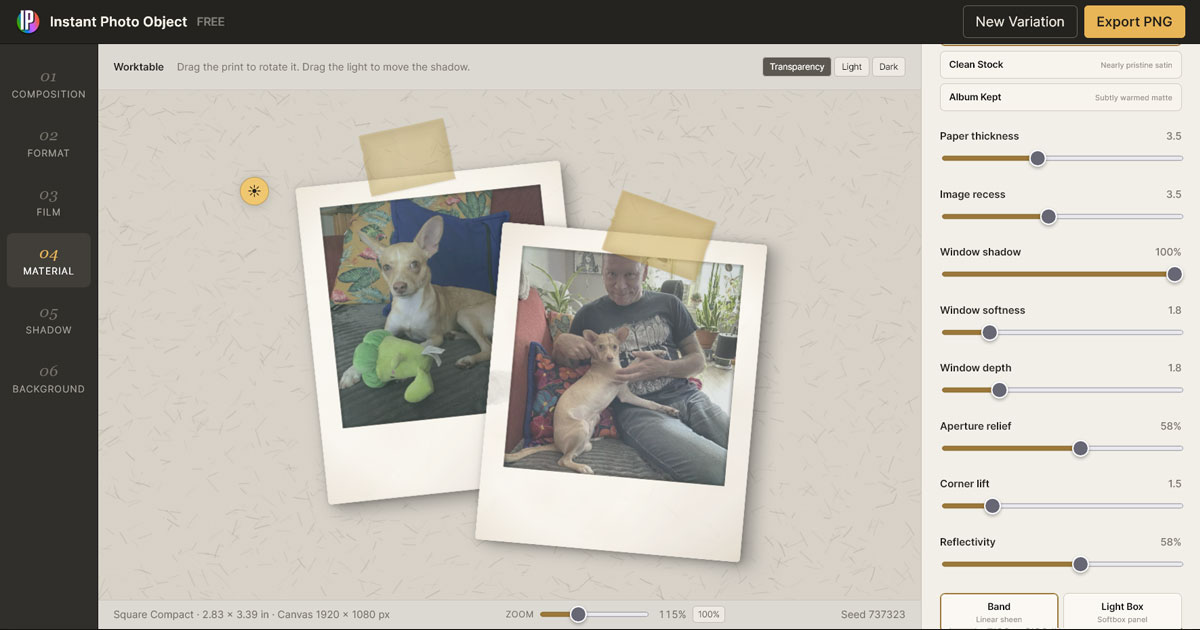
Rather than treating a photograph as a flat rectangular image with effects applied on top, Instant Photo Object treats it as a real object with paper thickness, borders, surface wear, fingerprints, aging, reflections, tape, shadows, and historically recognizable print characteristics.
The goal was to create a flexible photographic object maker that could reproduce the visual qualities of instant film, family snapshots, vintage photographic prints, and glossy physical photographs directly in the browser.
Users can choose photographs from their own devices and build highly customizable physical photo objects entirely in the browser. Images are processed locally and are not uploaded to the website or sent to a server. Features include:
-
- Multiple authentic instant-photo formats with physically proportioned borders and image windows
- Straight photographic prints, rounded snapshots, scalloped prints, and restrained decorative deckle edges
- Full-bleed photographic prints with adjustable border widths and physically scaled corner radii
- Black & White and Sepia photographic treatments with independently adjustable treatment strength
- Film aging controls including Fade, Black Lift, Color Drift, Development Variation, Highlight Bloom, Edge Chemistry, Warmth, Saturation, Contrast, and Optical Softness
- Independent Chemistry Character presets with adjustable Chemistry Strength, allowing aging characteristics to be layered without resetting manually adjusted film controls
- Matte, satin, and glossy photographic surfaces with movable reflections and lighting
- Band, Light Box, and Screen Glare reflection systems for creating anything from subtle laminate sheen to dramatic high-gloss product-style reflections
- Real fingerprint impressions drawn from a dedicated fingerprint atlas, with controls for opacity, size, variety, and placement across the photograph and paper
- Photo surface wear including scratches, scuffs, laminate damage, paper aging, and edge grime
- Scotch and masking tape with per-photo positioning, size, opacity, aging, adhesive contact, lifting, edge halos, and irregular tape ends
- Movable lighting with physically responsive shadows, contact shadows, paper thickness, and surface reflections
- Single, Pair, and Stack composition modes with independently editable photographic objects, each with its own Color, Black & White, or Sepia treatment, chemistry character, aging, warmth, saturation, contrast, and optical softness
- Adjustable canvas sizes for landscape, square, portrait, widescreen, and vertical story compositions
- Solid, paper, card, fabric, and speckled-paper backgrounds with adjustable texture strength and density
- Transparent PNG export for isolated photo objects, including true rounded, scalloped, and deckled silhouettes
A major challenge in developing Instant Photo Object was maintaining the illusion that the photograph was a coherent physical object rather than a collection of unrelated digital effects.
Decorative edges needed to affect not only the visible paper, but also clipping, transparency, aging, fingerprints, shadows, reflections, and export. Tape needed to remain attached to individual photographs, while each photo required its own independent color treatment, chemistry character, aging, warmth, saturation, contrast, and optical characteristics. This allows photographs within the same composition to appear as though they came from different cameras, processing conditions, or periods in time.
Another important goal was preserving creative freedom without turning the application into Photoshop. The interface therefore focuses on recognizable photographic and physical decisions rather than exposing large numbers of technical controls.
The result is a surprisingly deep photographic simulation engine that can create everything from a clean modern instant photo to a worn family snapshot, an aged archival print, or a highly polished glossy photograph, while remaining approachable enough to use directly in a web browser.
You can see the full site here: GreenMacaroni.com/InstantPhoto
Palette JSON Sorter
A companion tool for organizing and refining Palette Grabber color libraries
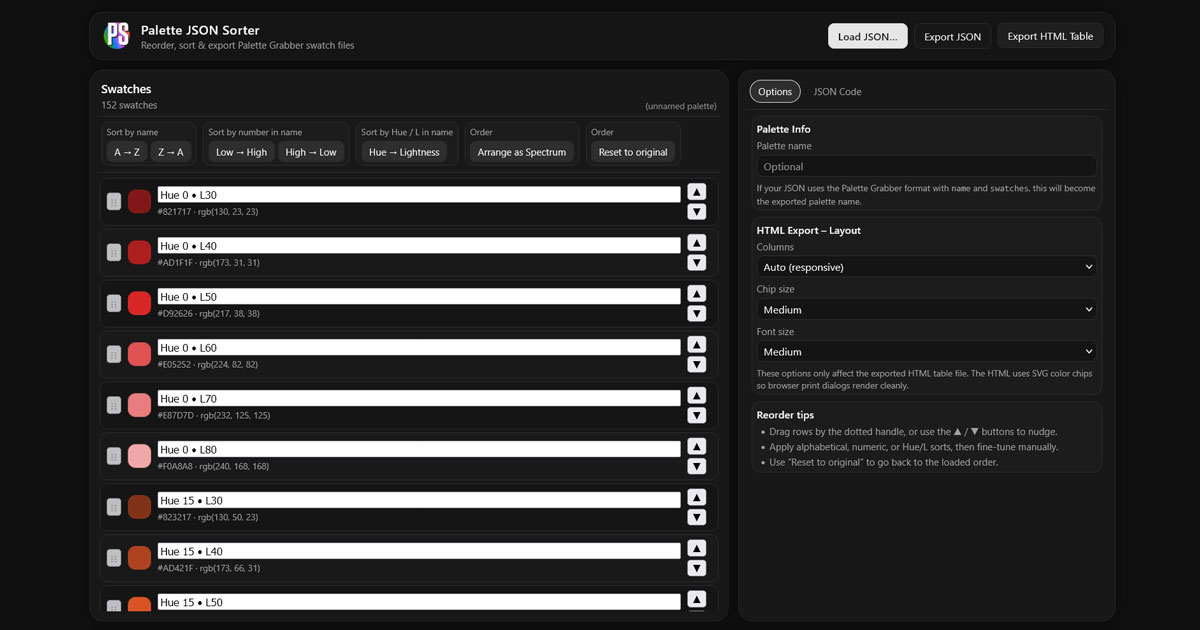
Palette JSON Sorter was developed as a companion tool to Palette Grabber, designed to give users greater control over how their color libraries are structured and presented.
As palette libraries grow in size and complexity, organizing swatches in a meaningful way becomes essential. This tool allows users to load Palette Grabber JSON files and quickly reorder, refine, and prepare them for use across different workflows.
Key capabilities include:
- Reordering swatches alphabetically, numerically, or by hue and lightness
- Spectrum-based sorting for clean, visually progressive color arrangements
- Manual fine-tuning for precise control over swatch order
- Exporting palettes as structured JSON files for reuse
- Exporting palettes as clean, print-friendly HTML tables
A key consideration in developing this tool was preserving the integrity of the original palette data while allowing flexible reorganization. This ensures that users can experiment with different arrangements without losing their source structure.
Palette JSON Sorter extends the Palette Grabber ecosystem, transforming raw color libraries into clean, structured, and presentation-ready systems.
You can see the full site here: GreenMacaroni.com/Palette-JSON-Sorter
Font Harmony
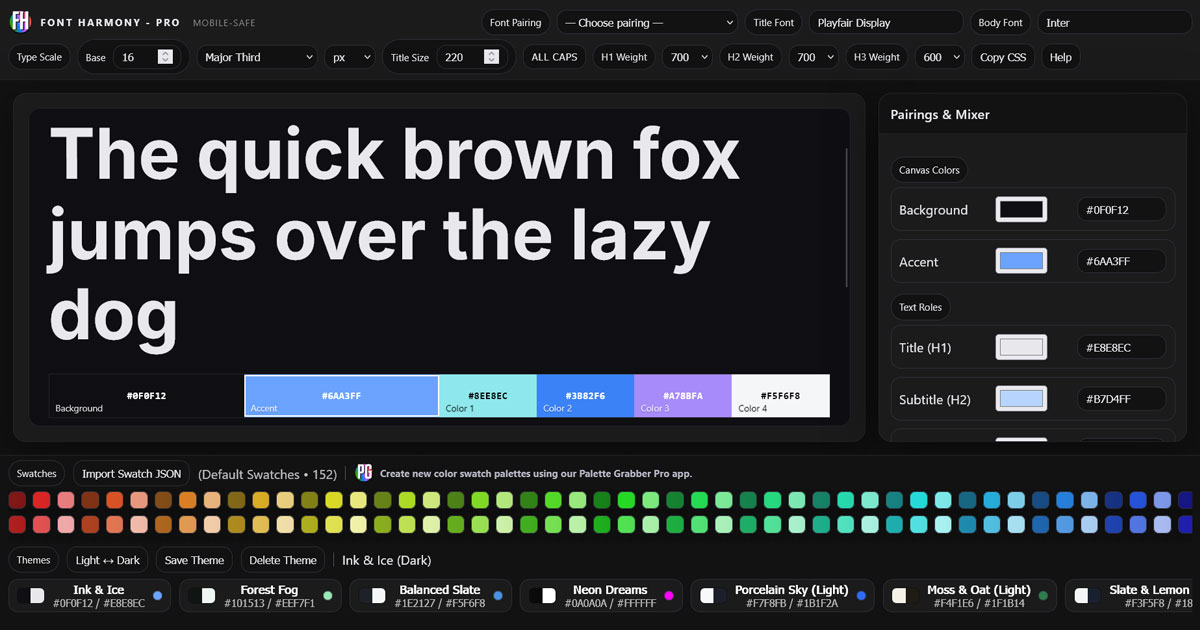
A typography and style system tool built around the Google Fonts ecosystem
Designed for creating complete, reusable typographic and color systems for web design
Font Harmony was developed to help designers and developers move beyond simple font selection and into building cohesive typographic systems.
While many tools focus only on pairing fonts, Font Harmony is designed to create full style frameworks — combining typography, color, and hierarchy into a unified, usable output.
The tool is built around an expanded Google Fonts library, giving users access to a broad and flexible range of typefaces while maintaining a clean and structured interface.
Users can design and refine complete typographic systems with:
- Live preview of headings, body text, and hierarchical structure
- Adjustable type scales, weights, and spacing for real-world readability
- Predefined font pairing sets to guide strong combinations
- Integrated color themes, including direct import from Palette Grabber libraries
- Full CSS export, allowing designs to be implemented immediately in production
- Import color palettes from Palette Grabber
A key challenge in developing Font Harmony was balancing flexibility with clarity. Typography systems can quickly become complex, so the interface was carefully designed to keep controls accessible while still allowing precise adjustments.
Another important consideration was bridging design and development. By generating clean, usable CSS, the tool removes the gap between visual exploration and implementation — allowing users to move directly from concept to working code.
Font Harmony transforms typography from a visual choice into a structured system, helping users create designs that are not only visually appealing, but consistent, scalable, and ready for real-world use.
You can see the full site here: GreenMacaroni.com/Font-Harmony-Pro
Font Degrader
A typography tool for controlled distortion, expressive effects, and creative exploration
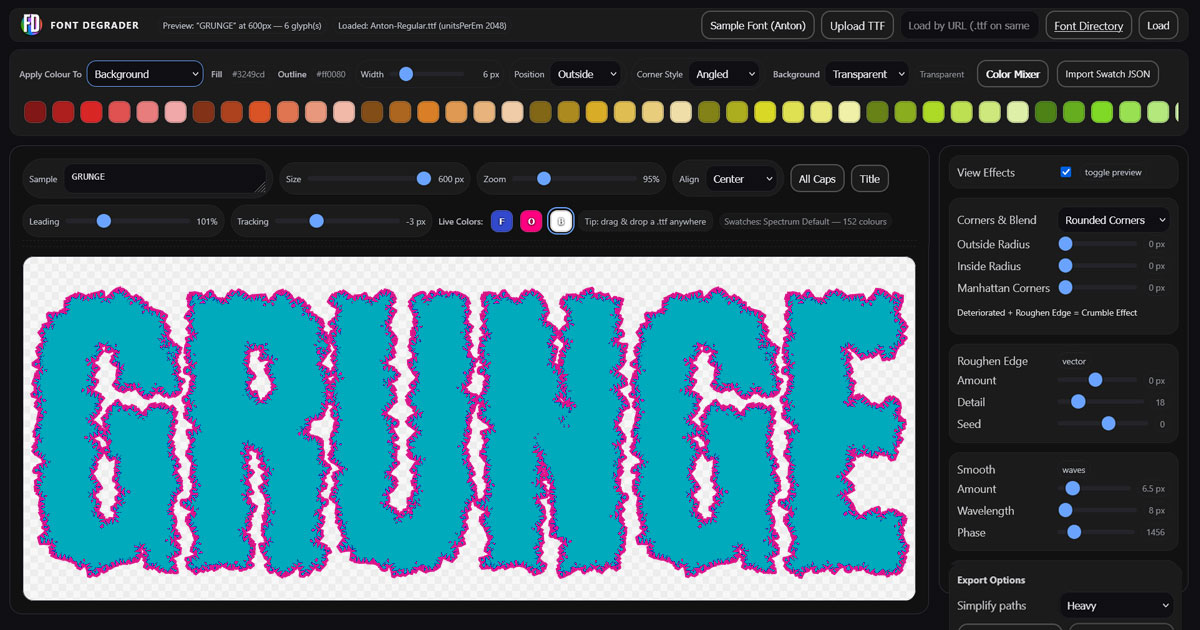
Font Degrader is a browser-based typography tool designed to introduce controlled imperfection into digital type.
While most design software prioritizes precision and clarity, Font Degrader explores the opposite space — allowing users to degrade, distort, and manipulate text to create character, texture, and visual depth.
The tool was inspired by analog imperfections such as ink spread, print wear, and mechanical inconsistencies, while maintaining enough control to preserve readability and intentional design.
Key features include:
- Real-time distortion and degradation controls
- Fine-tuned balance between readability and expression
- Live color editing (fill, outline, background) with integrated color mixer
- Palette-based workflow with swatch import support
- High-resolution export (SVG and PNG) with unique file naming
- Adjustable stroke positioning and styling (inside, outside, angled, and more)
- Support for custom TTF font uploads
- Precision controls for spacing, scaling, and layout
- Import color palettes from Palette Grabber
A central challenge in developing Font Degrader was finding the balance between randomness and control.
Too much distortion quickly destroys legibility. Too little makes the effect invisible.
The system was iteratively refined to produce results that feel organic and expressive without becoming chaotic — allowing users to explore a wide spectrum from subtle texture to heavily stylized typography.
Font Degrader reframes imperfection as a creative tool.
By combining real-time feedback, fine control, and flexible color workflows, it enables designers to create typography that feels more tactile, human, and visually distinctive — while remaining usable in real-world design contexts.
You can see the full site here: GreenMacaroni.com/Font-Degrader
Font Degrader Pro
A browser-based typeface creation tool for transforming existing fonts into new, fully functional distressed typefaces
Font Degrader Pro began as an expansion of the original Font Degrader, but gradually evolved into something much more ambitious: a complete browser-based system for modifying actual font geometry and exporting the results as new, installable OpenType fonts.
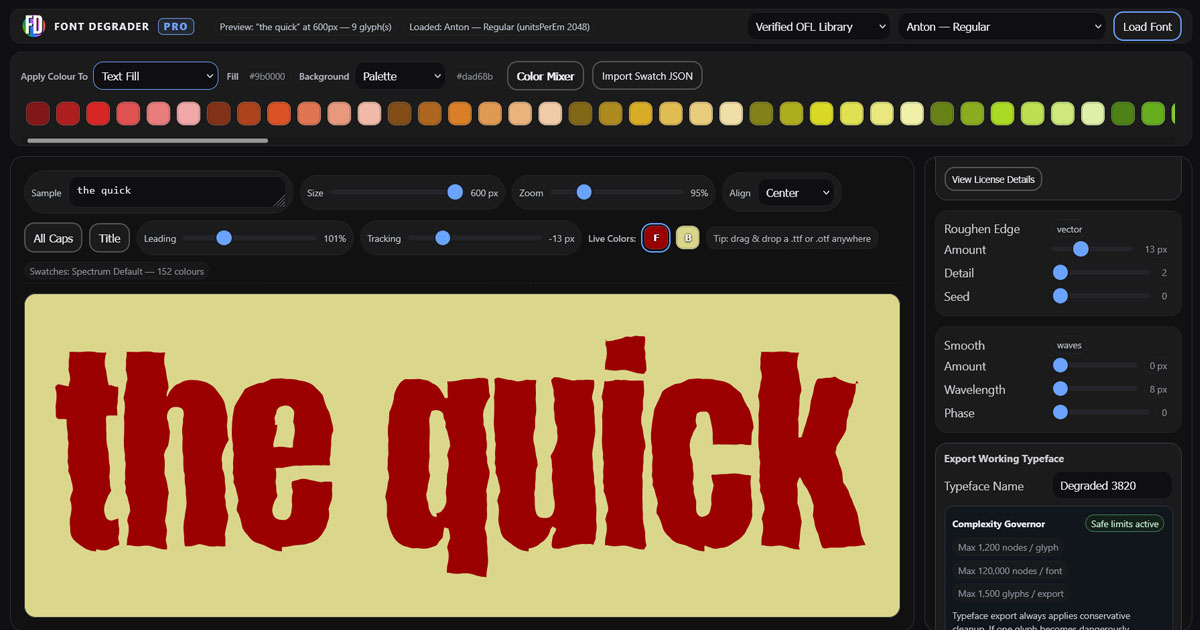
Rather than applying a visual effect to text or exporting distressed lettering as artwork, Font Degrader Pro works directly with the outlines that make up each glyph. Users can reshape, roughen, distort, and organically alter an entire typeface, then generate a functioning OTF font from the result.
The app includes a curated library of 96 open-source SIL OFL fonts, while also allowing users to upload their own compatible TTF or OTF fonts. Uploaded fonts are processed locally in the browser and are never sent to a server.
Key features include:
- 96 included SIL Open Font License typefaces
- Support for user-supplied TTF and OTF fonts
- Local browser-based processing for uploaded fonts
- Geometry-based Roughen Edge, Smooth, and degradation effects
- Seed-based variation for repeatable distressed results
- Real-time typography preview with adjustable size, zoom, tracking, leading, and alignment
- Integrated color palettes, live fill/background controls, and draggable color swatches
- Palette import support for workflows shared with other Green Macaroni tools
- SVG and PNG artwork export
- Generation of real, installable OTF fonts
- Automatic ZIP packaging with font, README, license, and export information
- Complexity Governor for safely managing extremely detailed glyph geometry
- Automatic retention and remapping of usable Unicode glyphs and kerning
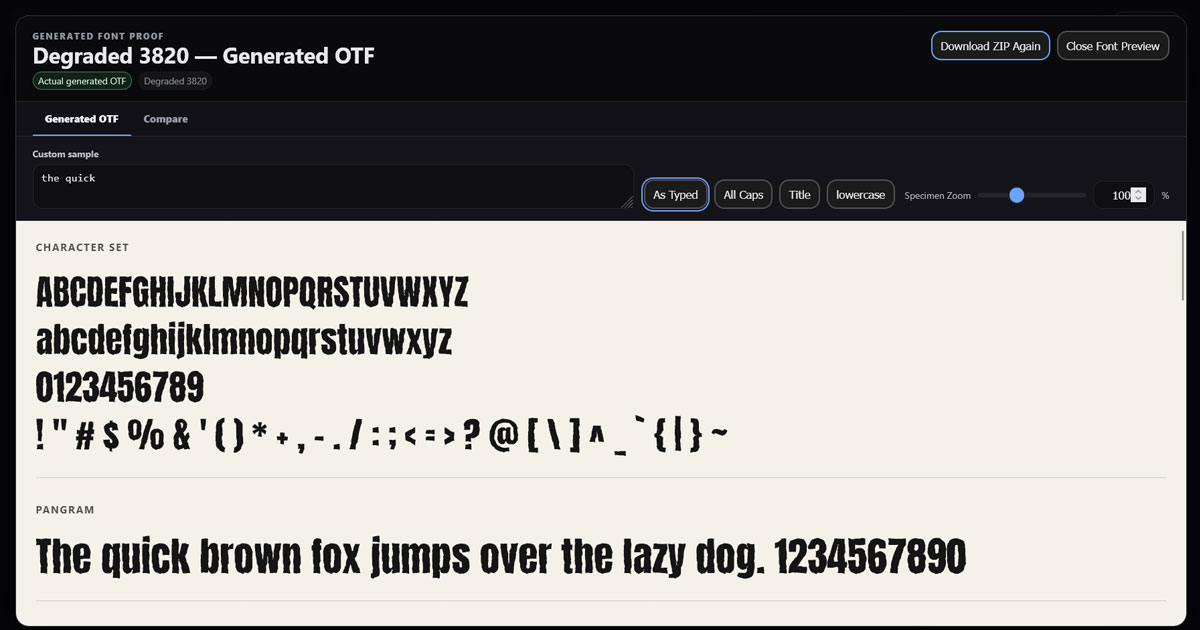
- Built-in Generated Font Proof using the actual exported OTF
- Editable font specimens from small text sizes through large display sizes
- Detail inspection from 12 px to 500 px
- Side-by-side comparison of the original design preview and generated OTF
One of the most difficult challenges in developing Font Degrader Pro was maintaining visual fidelity while generating fonts complex enough to contain thousands of altered curves.
A distressed preview can contain far more geometric information than is practical or safe to place directly into an OpenType font. Early approaches could successfully generate a font while subtly simplifying or weakening the intended effect.
The final system takes a different approach: preview fidelity comes first.
Where possible, dense glyph contours are represented using adaptive cubic Bézier curves that reduce unnecessary node counts without redesigning the effect. Roughen Edge and Smooth settings remain faithful to the user’s chosen values rather than being silently reduced simply to make an export succeed.
If a font cannot be generated safely while remaining sufficiently close to the design preview, Font Degrader Pro stops the export and explains which settings can be adjusted. A failed export is considered preferable to producing a font that does not resemble what the user designed.
The completed font can then be inspected immediately inside the app using the Generated Font Proof. This viewer loads the actual newly generated OTF through the browser’s FontFace system, allowing users to evaluate the real font at sizes ranging from ordinary text to extremely large contour inspection.
A Compare view places the exact export-time design geometry beside the generated OTF, making it possible to visually confirm how closely the finished font matches the original design.
The result is a tool that can produce far more than conventional distressed typography. Small combinations of parameters can transform familiar source fonts into unexpected new display faces, often creating forms that feel printed, eroded, hand-cut, mechanical, organic, or entirely accidental.
Because users can begin with almost any compatible typeface they have the rights to modify, Font Degrader Pro becomes an open-ended system for typeface experimentation rather than a fixed collection of visual effects.
Font Degrader Pro treats imperfection not simply as decoration, but as a method of type design and discovery.
You can see the full site here: GreenMacaroni.com/Font-Degrader-Pro
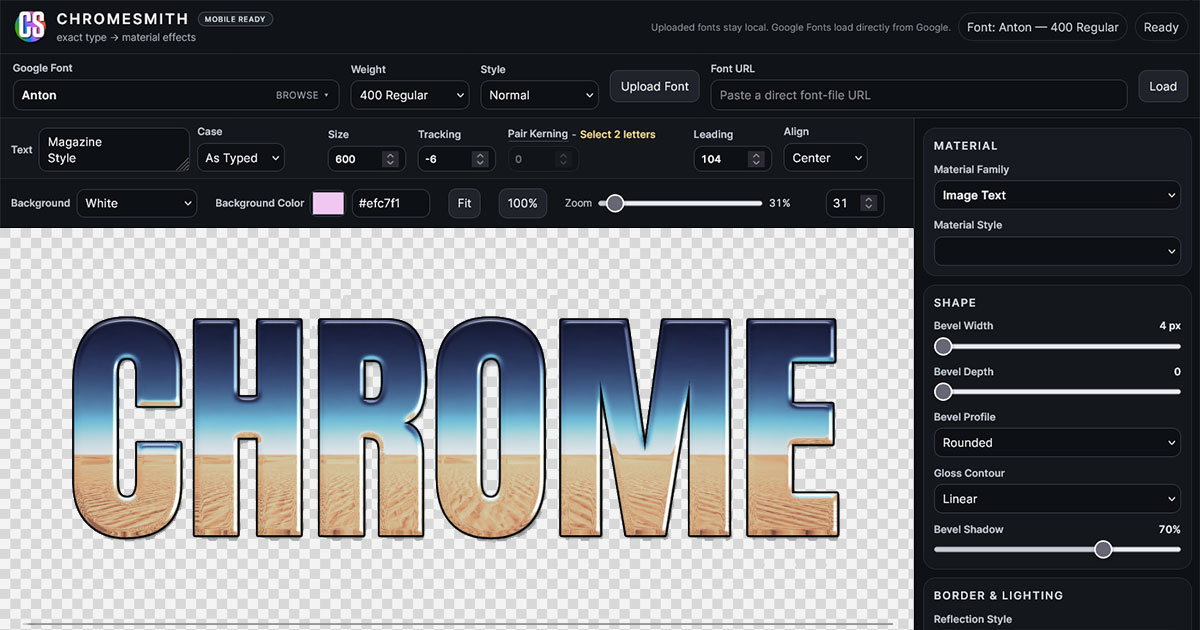
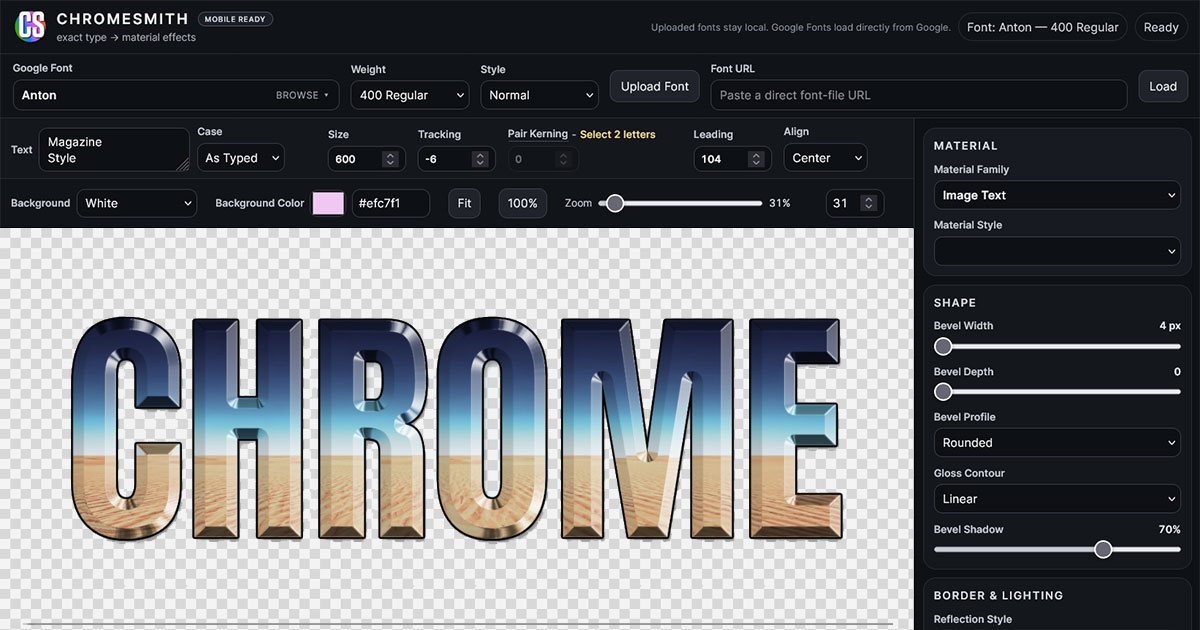
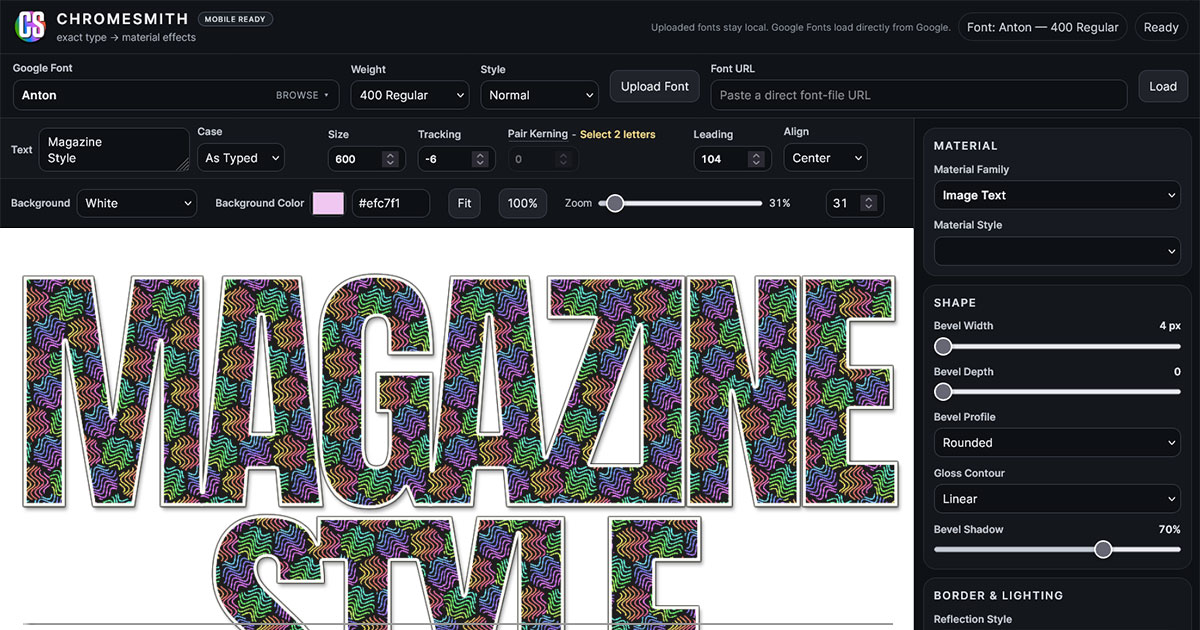
ChromeSmith
A browser-based typographic effects studio for creating chrome, gold, stone, glass, image-filled, and other dimensional lettering
ChromeSmith was developed to bring the kind of elaborate typographic effects traditionally created in Photoshop or specialist plug-ins directly into the browser.
The central idea was simple: instead of asking an AI image generator to approximate a particular style of lettering, ChromeSmith allows the designer to choose the exact typeface they want and then build the material effect around it.
Users can work with the full Google Fonts library or upload their own fonts, then create highly customized rendered typography while retaining complete control over the original letterforms.
ChromeSmith includes a growing collection of material and rendering systems, with controls including:
- Full Google Fonts access together with custom font uploading
- Live text editing with size, tracking, leading, alignment, pair kerning, case controls, direct numerical adjustment, and responsive preview zoom
- Multi-line typography with component-aware material mapping: separate lines retain independent reflections and textures, while physically connected lines automatically behave as one continuous material object
- Adjustable bevel width, depth, profile, and corner roundness for sculpted three-dimensional lettering
- Directional lighting, highlights, shadows, surface softness, and reflection controls
- Chrome and metallic reflection systems with adjustable contrast, saturation, zoom, and positioning
- Gold, stone, diamond, crushed glass, and other material treatments
- Built-in Texture & Image Library together with local image uploading for custom stone, metal, patterned, photographic, and image-filled typography
- Texture scaling, positioning, opacity, and blend modes for integrating artwork created in tools such as PatternSmith
- Image Text mapping with Each Line and Whole Text modes, allowing a single photograph or artwork to flow through an entire block of typography
- Independent borders with adjustable thickness, color, shadows, rounded corners, and dimensional treatment
- Adjustable sparkle amount, size, and randomized placement for reflective and gem-like finishes
- Transparent-background rendering for typography that can be placed directly into other designs
- High-resolution PNG and JPG export with Crop to Artwork or Whole Canvas options
- Saveable JSON material settings that can be reloaded, shared, and used to reproduce custom finishes
One of the most difficult challenges in developing ChromeSmith was creating convincing bevel geometry from live browser-rendered type. A typographic bevel cannot simply shrink the entire glyph toward its centre. Each stroke, counter, corner, and internal shape needs to behave as though the letter were a genuinely dimensional object.
This required extensive refinement of the rendering system, particularly around internal corners, horizontal and vertical strokes, borders, highlights, shadows, and the way multiline typography responds to material mapping. ChromeSmith can now detect when lettering from separate lines physically connects and automatically treat the joined geometry as a single material object, allowing reflections and textures to continue naturally across the connection.
Another important part of the project was making complex materials customizable rather than relying on a collection of fixed visual presets. Reflections, textures, lighting, borders, and surface characteristics can all be adjusted independently, allowing a single material system to produce a very wide range of results.
ChromeSmith was designed to remain approachable despite the complexity of its rendering system. It works across desktop and mobile browsers, includes direct manipulation and precision controls, and allows finished transparent typography to move easily into other browser-based tools such as GridSmith for further composition.
The result is a browser-based typography studio that combines the precision of real fonts with the visual richness of rendered graphic effects. ChromeSmith gives designers a fast way to create highly polished display lettering while keeping control over the exact typeface, material, lighting, and finish.
You can see the full site here: GreenMacaroni.com/ChromeSmith
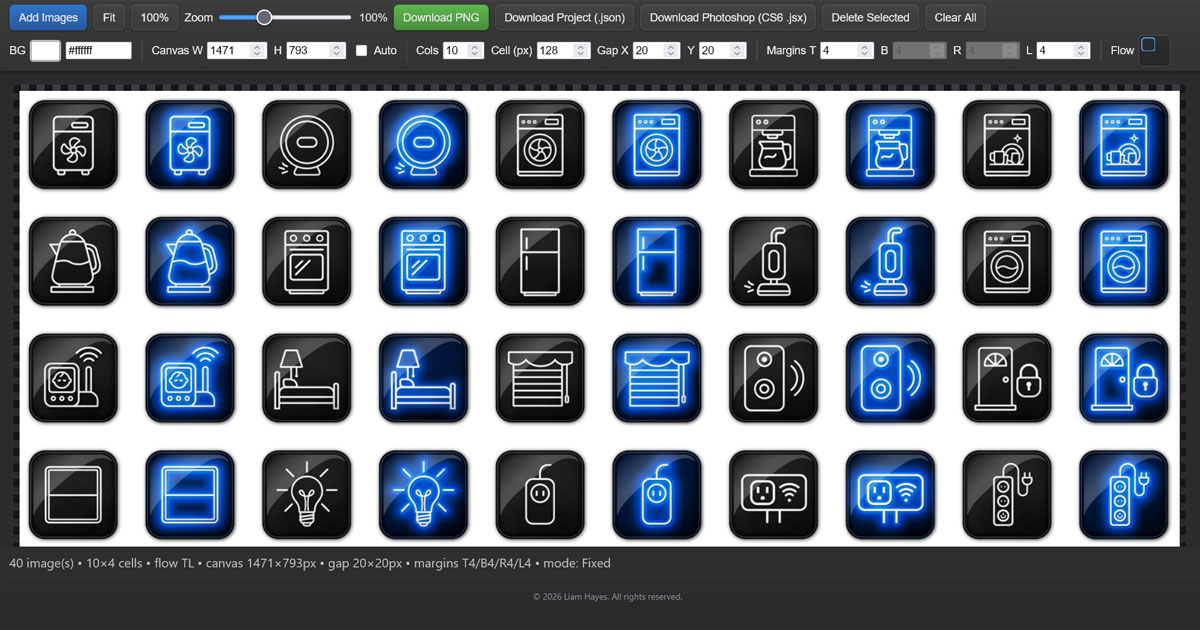
Grid Builder
A layout engine for building consistent, reusable grid systems
Grid Builder was developed to simplify and streamline the often tedious process of constructing precise image and object grids for both print and web design.
Rather than manually placing and aligning elements, users can quickly generate structured grid layouts and adjust spacing, sizing, and colours dynamically in real time — seeing changes instantly as they refine the design.
A key feature of Grid Builder is its ability to export layouts as a Photoshop script. This allows designers to reuse the exact same grid configuration across multiple projects or pages, ensuring complete consistency in spacing and alignment.
This is particularly valuable in applications such as book publishing, catalog design, or any workflow that requires a repeatable visual system.
Special attention was given to:
- Real-time visual feedback while adjusting grid parameters
- Precise spacing logic to ensure consistent results
- A streamlined interface that reduces repetitive manual work
One of the main challenges was translating flexible, visual grid adjustments into a reliable, repeatable output format. This was solved by developing a system that preserves exact spacing and proportions when exported, allowing the grid to function as a reusable layout engine rather than a one-off design tool.
The result is a practical utility that bridges the gap between concept and production, giving designers a faster and more consistent way to build structured layouts.
You can see the full site here: GreenMacaroni.com/Grid-Builder
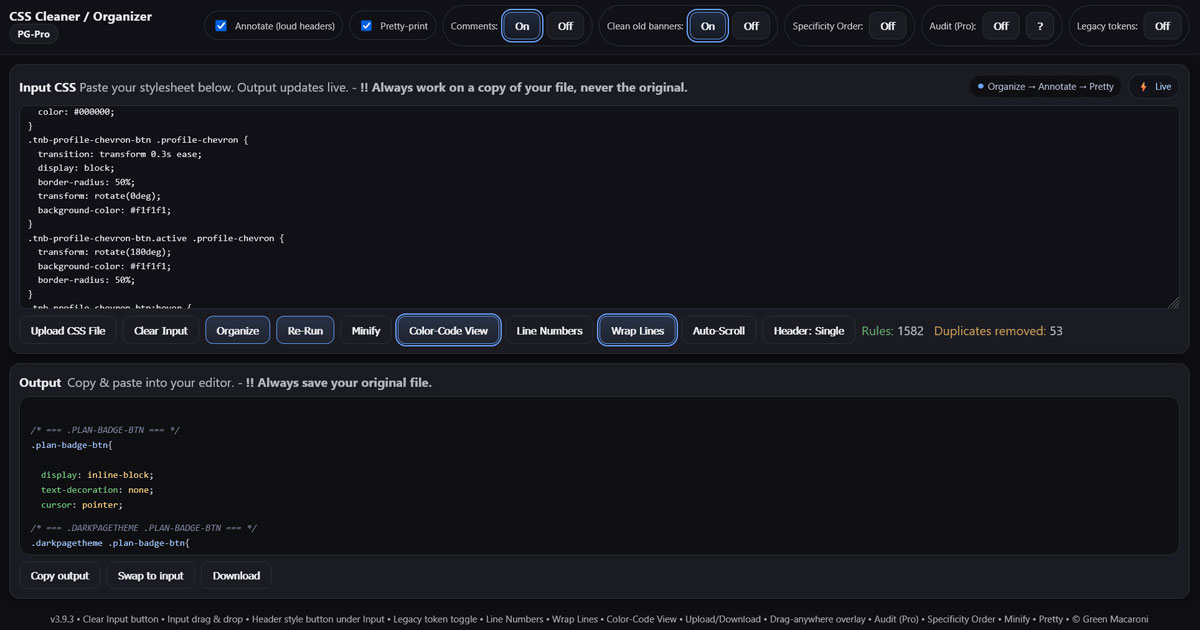
CSS Cleaner
A practical tool for organizing, annotating, and cleaning CSS files
CSS Cleaner was developed to help designers and developers turn messy or difficult-to-read stylesheets into cleaner, more organized code.
It is especially useful when working with long CSS files, inherited code, theme overrides, or experimental styling that needs to be prepared for reuse.
Key features include:
- Live CSS input and output
- Automatic organization and cleanup
- Optional loud headers for clearer section separation
- Comment controls
- Minify mode
- Line numbers, wrap lines, and color-code view
- Upload, download, copy, and swap-to-input options
A key challenge was creating a tool that improves readability without forcing users into one rigid formatting style. CSS Cleaner was designed to be flexible, helping users clean and structure code while still preserving control over the final output.
The result is a fast, browser-based utility that helps designers and developers transform cluttered CSS into cleaner, easier-to-maintain stylesheets.
You can see the full site here: GreenMacaroni.com/CSS-Cleaner
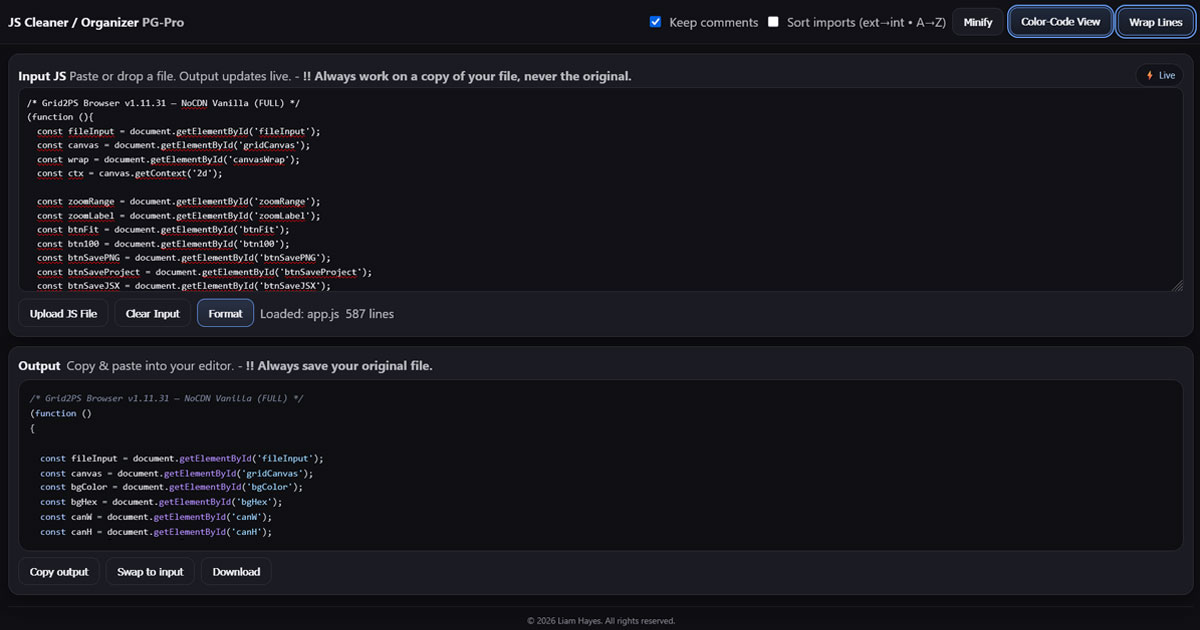
JS Cleaner
A browser-based tool for formatting, reviewing, and cleaning JavaScript
JS Cleaner was created as a companion utility for working with JavaScript files more safely and efficiently.
It helps users paste, upload, format, minify, review, and copy JavaScript code directly in the browser, with a clear warning to always work from a copy rather than an original file.
Key features include:
- Live JavaScript input and output
- Format and minify options
- Optional comment preservation
- Import sorting
- Color-code view
- Wrap lines
- Upload, download, copy, and swap-to-input options
The main challenge was keeping the tool simple while supporting practical code-cleaning workflows. JS Cleaner focuses on clarity, speed, and safer editing, making it useful for quick cleanup, review, and preparation before pasting code back into a project.
The result is a lightweight browser-based utility that helps designers and developers clean, organize, and review JavaScript more efficiently.
You can see the full site here: GreenMacaroni.com/JavaScript-Cleaner
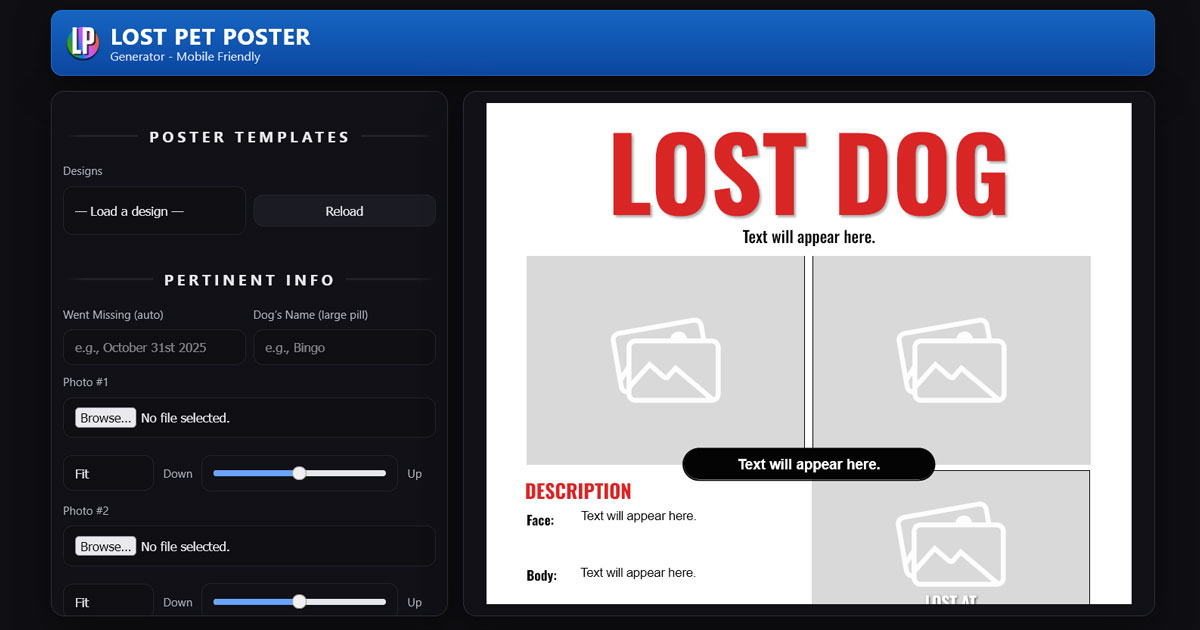
Lost Pet Poster
A simple, mobile-friendly tool for creating clear, print-ready lost pet posters
Designed for speed, clarity, and ease of use during stressful situations
Lost Pet Poster was developed as a practical, real-world design tool focused on helping people create effective posters quickly when a pet goes missing.
In these situations, users are often under stress and need a solution that is fast, simple, and reliable. The tool was intentionally designed with a streamlined interface that removes complexity and focuses only on what matters.
Users can create a complete, print-ready poster directly from their browser — including on a smartphone — by simply:
- Entering key information
- Uploading photos
- Downloading a finished JPG ready for printing or sharing on social media
The tool emphasizes:
- Clear visual hierarchy for maximum readability
- Mobile-friendly usability for on-the-go creation
- Reliable JPG export that matches the on-screen design
- Consistent typography and layout for a professional result
A key challenge in developing Lost Pet Poster was ensuring that exported posters remain visually consistent across devices, particularly on mobile platforms. This required careful handling of fonts, layout rendering, and export logic to guarantee predictable results.
The result is a focused, compassionate design tool that solves a real problem — helping users create clear, effective posters quickly, when it matters most.
You can see the full site here: GreenMacaroni.com/Lost-Pet-Poster
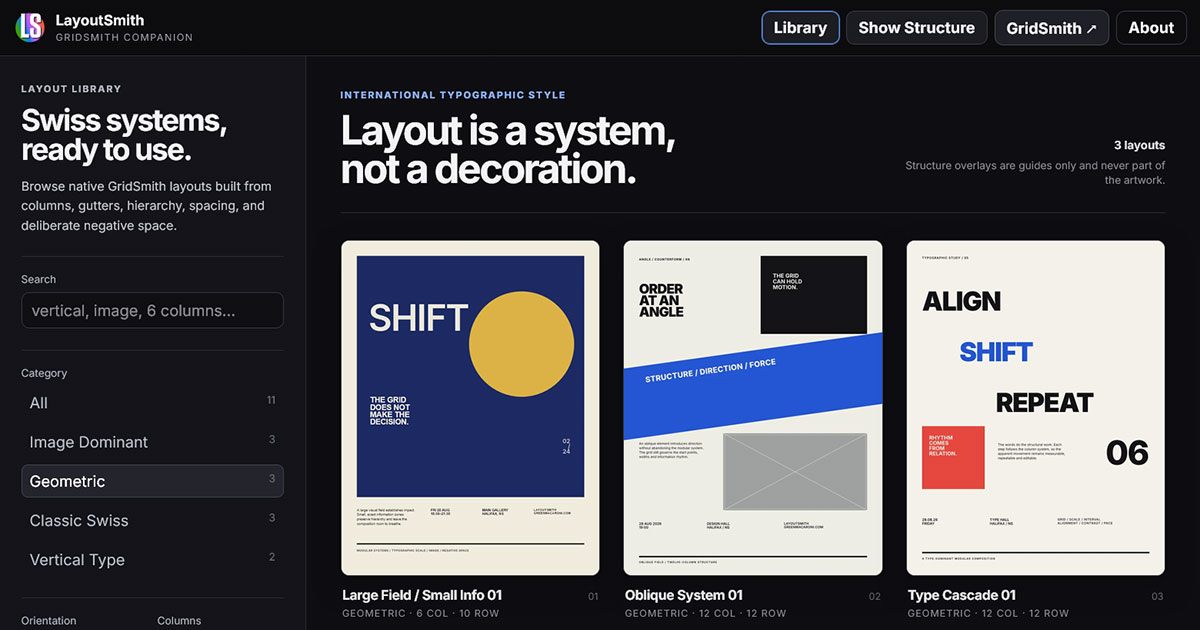
LayoutSmith
A browser-based layout template system for exploring, understanding, and building strong graphic design compositions.
LayoutSmith was developed as a companion to GridSmith, focused specifically on one of the most important — and often most difficult — parts of graphic design: creating a strong underlying layout.
Rather than starting every poster from an empty page, LayoutSmith provides professionally structured layout templates that can be explored visually and then used as starting points for new designs.
The project is strongly influenced by Swiss and International Typographic Style principles, where grids, alignment, proportion, hierarchy, negative space, and deliberate asymmetry form the foundation of the composition.
LayoutSmith is designed not simply as a collection of finished templates, but as a way of exposing the structure behind them. Users can examine how a composition has been constructed and then adapt that underlying system to their own content.
Key features include:
- A visual library of professionally designed poster layout templates
- Layouts built around structured grid systems rather than fixed decorative compositions
- A Show Structure view that reveals the underlying layout logic behind each design
- Templates designed to demonstrate practical relationships between margins, columns, gutters, typography, imagery, and negative space
- Direct integration with GridSmith, allowing a selected layout to become the starting point for a fully editable poster design
- The ability to import a template’s Layout Grid or preserve an existing GridSmith grid, ensuring that carefully constructed custom grids are never overwritten unintentionally
- Reusable template architecture that allows the LayoutSmith library to continue expanding with new styles and composition systems
- A browser-based workflow requiring no installation, account, or specialized desktop design software
A major goal of LayoutSmith was to avoid the limitations of conventional template systems. Many template libraries encourage users to replace text and images inside an essentially finished design. LayoutSmith instead treats the template as a structural starting point — something that can be studied, modified, dismantled, and transformed into an entirely different composition.
This also presented an important UX challenge. LayoutSmith needed to integrate tightly with GridSmith while respecting work that a user may already have created. Template importing therefore deliberately separates the visual layout from the underlying Layout Grid, allowing users to choose whether the template’s grid should be brought across or whether their existing GridSmith structure should remain untouched.
The result is both a practical design resource and a visual exploration of layout theory: a growing collection of composition systems intended to help users move more quickly from a blank page to a thoughtful, balanced poster design.
LayoutSmith works alongside GridSmith as part of the Green Macaroni family of browser-based creative tools.
You can try LayoutSmith here: GreenMacaroni.com/LayoutSmith